
Instagram Collabs for Small Businesses - a great feature for increased reach
Still trying to figure out the Instagram algorithm and get back the higher reach and engagement you had a couple of month back? Our best advice is to keep focusing on that good content you were delivering and also to consider incorporating the newer Instagram features - one in particular: Instagram Collabs.
When done right, Instagram Collabs are one of the best (unpaid) routes to boosted reach and engagement, in particular for small businesses accounts. Launched in autumn 2021, the Instagram Collabs feature has been embraced by many Instagram users, especially in the influencer and creator community, while it is still unknown or under-used by many others. As the roll out is now complete, anyone using Instagram has the option to use this feature and we thought it is worth covering in a post - also because we find it pretty cool!
So, let’s look together at:
What is the (not so new anymore) Instagram Collab feature?
What’s the coolest aspect of it?
How does it work in practice?
What are the main benefits of making reels and posts with Instagram Collab?
What to consider when choosing to use Instagram Collabs over the standard account tagging?
How can small businesses incorporate Insta Collabs in their social media editorial strategy?
How can you invite collaborators and how can they accept or decline your invitation?
What is the Instagram Collab feature?
Long story short - a way to co-author Instagram Feed Posts or Reels.
And what’s so cool about it?
Our favorite aspect of Instagram Collab is exactly in its name - its collaborative angle. At Journee - Digital at Ease we are strong supporters of collaboration over competition and using the Instagram Collab functionality takes the statement of collaboration to a whole new level - in general, and also as a comparison to using profile tagging, which is the most common way of accounts association on Instagram. Here’s why:
All collaborator accounts are visible right away, at the top of the post or at the top of the caption for Reels.
The content is shared in all collaborators feeds and profile grids.
There is a sweet taste to the “and” word that ties the two (or more) collaborators accounts, don't you think?
It makes a more clear statement of working on something together.
On the other hand, it leaves no room for surprises nor forced association. If you find yourself tagged in many posts and images that you are not at all keen to be featured in, you know exactly what we mean! Well, the Insta collabs option requires you to accept and confirm the accounts association.
How does the Instagram Collabs feature work?
When making a feed post or a Reel you have the option to add/invite as co-author another account. A notification goes to the respective account and, if the invitation is confirmed, the account will be shown as well, as an author for the same post. The post looks like the below and it is posted on both (or all collaborators’) profile grids and in the feed of their followers. The Instagram Collab post will be one (doesn’t get multiplied for each account that collaborates on the respective post) and it garners the collective engagement (likes, comments and views are cumulated).
What are the benefits of using Instagram Collabs?
The Instagram Collabs feature brings a whole new and fine way of reaching new relevant audiences (there is an IF here, we develop this point further down). More new and relevant reach drives a boosted engagement (as all reactions will be cumulated) and hopefully this will lead to better results, be it in-store visits, product purchases, website visits, bookings or whatever makes you start the happy small business owner dance of joy.
Let’s recap!
All collaborator accounts will show on the post, separated by “and”.
Instagram Collab post or reel is posted on all accounts’ grids
Instagram Collab post or reel is shared to both (all) sets of collaborators’ followers
Likes, views and comments are shared and cumulated on an Instagram Collabs post/reel.
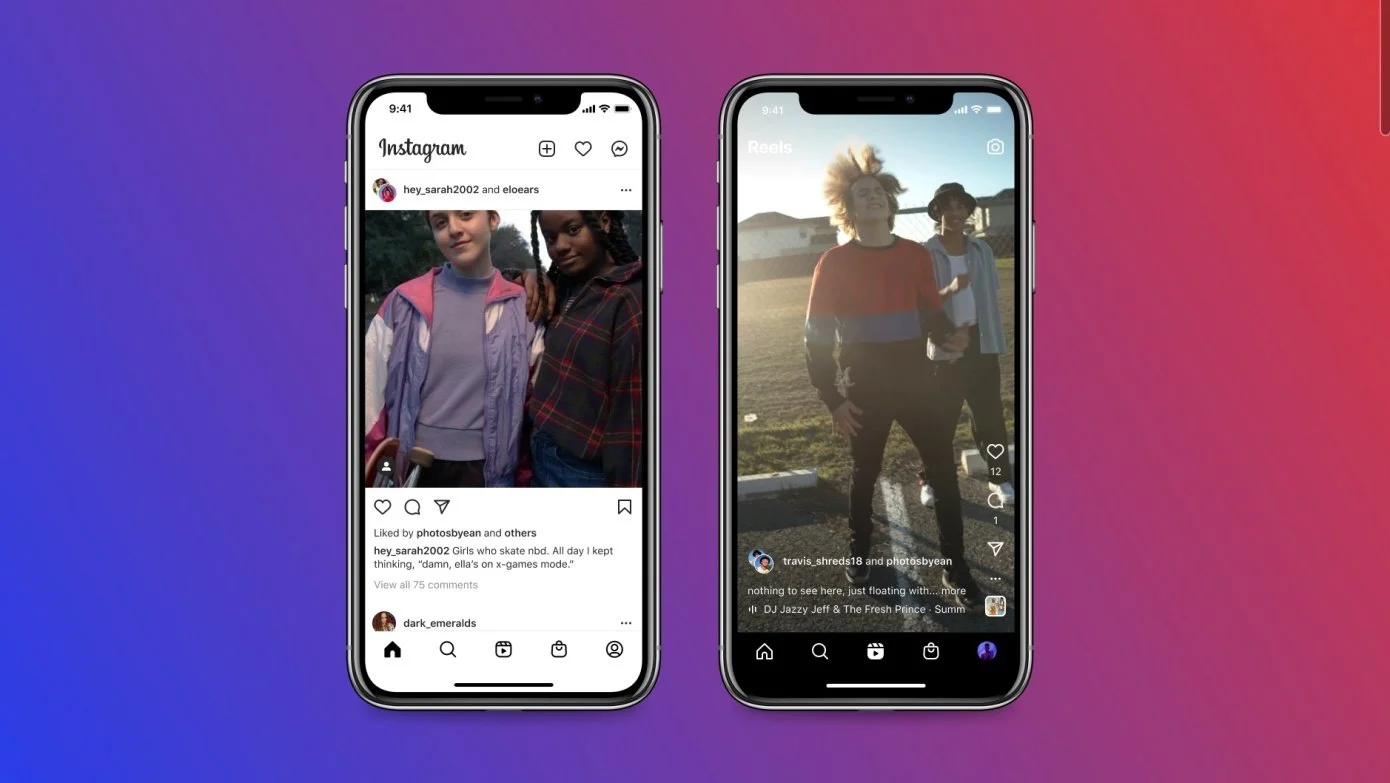
Image credits: Instagram
Now, I am sure these next points don't come as a surprise: (1) not every post is a good fit for a collab and (2) coming up with matching and relevant content for an Instagram Collab post/reel is not easy peasy either.
What makes for a good fit, content wise, for a collab post?
Here comes the if mentioned earlier: an Instagram Collab post/reel is a cool way of reaching new audiences if… if the content published in the collab post is relevant and somehow natural to receive as a follower. And the opposite is implied too - follower audiences that will be reached must be compatible with the message transmitted by the post.
So - make sure you design the content together as collaborators or that it gets approval from all collaborators before creating the post/reel and starting to send the collaboration invitations.
Shall we look at some concrete examples when an Instagram Collab is a perfect fit?
Announce / launch / promote a partnership or collaboration
Announce / promote a joint event or live
Collaborate with an influencer
Credit creators or partners who worked with you on a campaign / product / project
Run a giveaway or a contest together
Show your support for a shared cause
Promote or share a discount code
Cross promote your other own accounts
Let’s take some FAQs
How many collaborators can one invite?
Initially, there could have been only one other co-author invited for a post, but lately the original author has the option to invite up to 20 other accounts - the 20 limit is shared between the account tagging functionality and post collaborators (so you can tag 10 people and invite other 10 to be co-authors). Some aspects to consider when deciding on the number of collaborators:
the most common scenario is an Instagram Collab between 2 accounts.
it can be quite a stretch to have relevant content for 20 collaborators (think about the relevance of the content for their followers)
even when the content might be relevant for multiple collaborators and their followers, it might still be a good idea to create several posts, instead of one grouping them all - this is an opportunity to bring in a higher degree of customization aiming at an even better match for the audiences that will be exposed to the post.
Can collaborators be invited after the post is published?
As of now - no. The collaborator(s) must be invited before the post is published. In the posting flow, after invitations have been made, the original author marks the post as “done”. After this step, instant notifications are triggered to the invited collaborator(s) and, as such invitations get accepted, the post starts showing across the collaborating accounts.
Is it obligatory to have the post shared in your grid as an invited collaborator?
As of now - yes, if you accept the invitation. But you can decide to stop sharing at any point.
So, how do you invite and how do you accept an invitation for Instagram Collabs?
As the main author of the post or Reel (the content will be shown with your username) you can add other collaborators on the last screen before sharing your post or feed. It works pretty much as tagging another account:
When you get to the final share screen, tap “Tag People” and from this menu select “Invite a collaborator”.
Search for Instagram account(s) you’d like to collaborate with and select them.
Tap “Done” to save your settings - this will send instant notifications to the account(s) invited (it arrived in the messages tab)
Click “Share” to post your post to your Instagram feed.
As your collaborators accept your invitation, they will start showing on the post, and the content will be posted to their grid and shared with their followers too.
As someone who has been invited to collaborate on a post or reel, you have the options to accept or decline the invitation. One cannot unilaterally assign another account as co-author or collaborator.
Open the notification and then click on "Review"
Check the content and select "Accept" or "Reject"
If you have chosen “Accept”, you will appear as a co-author on the joint post and it will be shared on your profile grid and with all of your followers.
Tadaaa! Ready to get going with Insta Collab?

About Journee - Digital at Ease
Founded by two digital marketing professionals with extensive international experience, Journee GmbH is a female owned digital marketing and technology boutique consultancy.
We aim to make a big difference for the small: small business owners and solopreneurs looking to start and advance on their business digital journey.
Our combined expertise covers digital marketing, digital analytics, advertising, marketing technology as well as overall digital strategy support and mentorship.